
Mercator4
online tools
legacy versions

 © 2018-2026
Jülich Research Centre (FZJ)

The Mercator4 website is currently undergoing scheduled maintenance. This may result in temporary interruptions. We apologize for any inconvenience and ask for your understanding.
Job submission for protein annotation
list with a simple statistics on how many of the protein sequences were successfully categorized
| Submitted sequences | total number of user-submitted sequences |
| Classified sequences (C) | protein sequences put into Mercator4 protein categories |
| Annotated sequences (A) | sum of (C) and the sequences for which a Swiss-Prot annotation is available (only relevant if the Swiss-Prot annotation option has been selected) |
| Occupied Mercator4 categories (O) | occupied Mercator4 protein categories for which the user-submitted set contains matching sequences |
| Mercator4 categories available | total number of the currently available Mercator4 protein categories |
| Expected Length sequences (EL) | sequences (C) whose length lies within the IQR of category-specific reference lengths |
| Short Length sequences (SL) | sequences (C) whose length is below the IQR of category-specific reference lengths |
| Long Length sequences (LL) | sequences (C) whose length is above the IQR of category-specific reference lengths |
| Summary | summary of the results in a nutshell (data in per cent) |
bar chart summarising the protein assignments across the top-level context descriptions
Each bar represents a top-level context description and the percentage of its protein categories occupied by at least one protein from the submitted protein sequences.
bar chart displaying the distribution of protein lengths based on the differences to category-specific reference lengths
Each bar represents the number of proteins having a certain length difference to the median of reference lengths of the corresponding Mercator4 category.
download of protein annotation files for further processing on your local computer
| mercator4_result_data_fasta.zip | FASTA-format that contains the protein annotations |
| mercator4_result_data.zip | specific tabular format that is required for the and the MapMan desktop application |
Visualize result in tree viewer
The TreeViewer shows the protein categorization visualized as hierarchical tree with annotation context descriptions as branch nodes and protein categories as leaf nodes.
 encoded by the nuclear genome
 encoded by the plastidial genome in most or all plant clades
 encoded by the mitochondrial genome in most or all plant clades
Visualize result in heatmap viewer
The HeatmapViewer displays the comparison of two protein sets with protein categories as spots colored according to the comparison outcome.
 not present in either proteome (default state before selecting the protein sets)
 present only in proteome A
  present only in proteome B
  both proteomes contain the same number of paralogs
 proteome B contains 1 paralog more than proteome A
 proteome B contains 1 paralog less than proteome A
 proteome B contains 2+ paralogs more than proteome A
 proteome B contains 2+ paralogs less than proteome A
 encoded by the plastidial genome in most or all plant clades
 encoded by the mitochondrial genome in most or all plant clades
Online legacy protein annotation tool
Mercator version 3.6 is an older release of the context-based annotation approach based on a different annotation framework (see publication). The Mercator version 3.6 online tool is still available but any active maintenance has ended.
Publication
Lohse et al. (2014)
Mercator: a fast and simple web server for genome scale functional annotation of plant sequence data
Plant Cell Environ. 2014 May, 37(5): 1250-1258.
Online legacy protein annotation tool
Although it is recommended to use the latest version of Mercator4, it is possible to submit sequences to legacy versions. Please notice that the available older Mercator4 versions do no longer support the online tools and .
Online enrichment analysis of protein categories
The online Mercator4 enrichment analysis identifies protein classes that are over- or under-represented within the full set of Mercator4 protein categories (BINs). The method uses statistical approaches to identify significantly enriched or depleted groups of protein categories.
When an enrichment analysis finishes, the results are displayed.
Online validation of FASTA-formatted sequences
The FASTA-format is a text-based format for representing protein or nucleotide sequences. The FASTA validator allows users to test the FASTA-format of a sequence file before submitting it to Mercator4. Each record in the FASTA-formatted file will be validated and all records not supported by Mercator4 will be listed. Optionally, the user can check the Create Mercator4-valid FASTA file checkbox and download a Mercator4-valid version of the file with all records containing errors removed.
Requirements for a FASTA-formatted file
General requirements for a FASTA-formatted file
Single-letter codes for protein sequences supported in Mercator4
Mercator4 - an online protein annotation tool
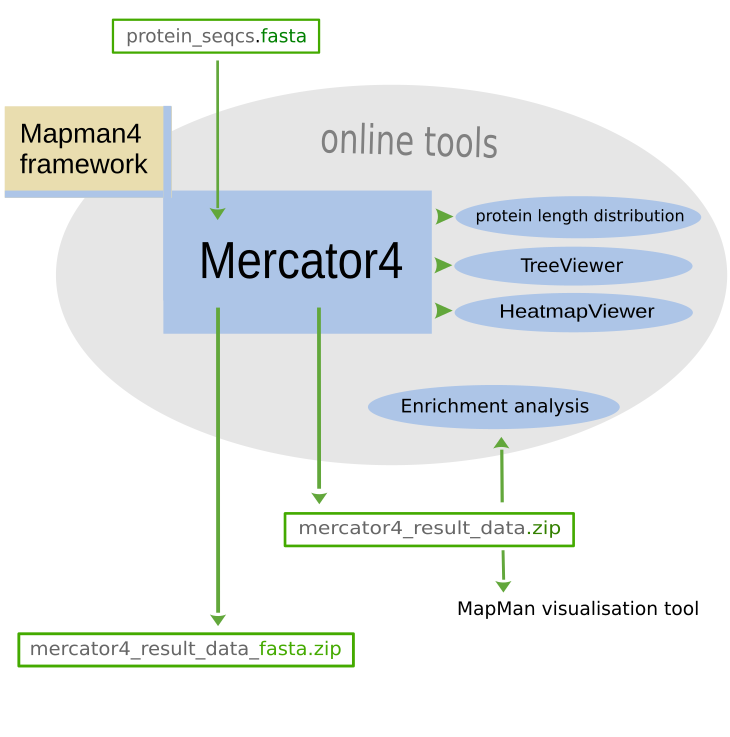
Mercator4 is an online tool to assign functional annotations to protein sequences of land plants (including flowering plants, ferns, horsetails, mosses, liverworts, and hornworts). Mercator4 can also annotate highly conserved proteins among the green algae groups of Archaeplastida. The results from user-submitted protein sequences can be visualized online and/or downloaded for further analysis.
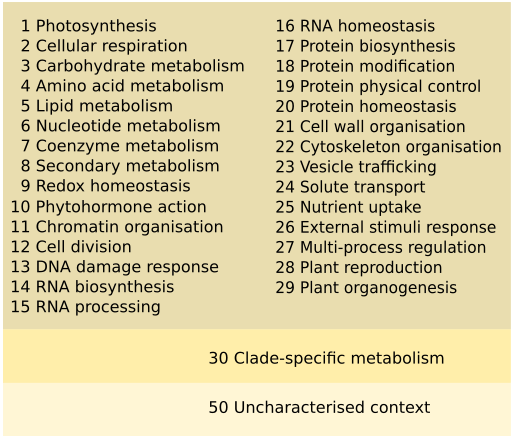
The Mercator4 functional annotations are designed as a hierarchical framework (Mercator4/Mapman4 framework) that mainly describes the functional context of a protein with each child node term being more specialised than its parent node term. The framework has currently 29 core categories ( 1 Photosynthesis to 29 Plant organogenesis) and the non-core category 50 Uncharacterised context. The protein sequences in all these categories are conserved in many land plant clades. An additional category 30 Clade-specific metabolism contains poorly conserved proteins that are specific to certain plant families (currently only available for Brassicaceae and Rubiaceae). Protein sequences are assigned to the protein categories at the leaf-level of the hierarchy but the actual Mercator4 annotation is based on the complete hierarchical path, including all levels.
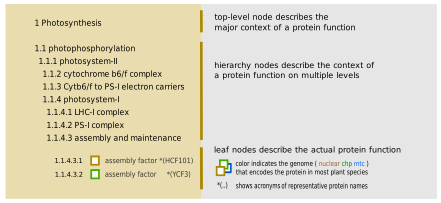
A protein's context and category is depicted as a hierarchical number. The first number of the hierarchy refers to one of the top-level categories. In an average land plant proteome, approximately 70% of the predicted protein sequences can be categorized by Mercator4 (version 8).
Protein sequences which cannot be categorized by Mercator4, are assigned by default to the pseudo-category 99 no Mercator4 annotation.
Optionally, for these proteins, it is possible to check (by using a simple BLAST local alignment) whether a similar protein is contained in the reviewed Swiss-Prot protein set (Swiss-Prot dataset of Viridiplantae proteins). If the search is successful the proteins are assigned to the pseudo-category 99.1 no Mercator4 annotation.other annotation available.
Protein function annotation results
When a Mercator4 job finishes, an overview of the results is displayed as
The Mercator4 protein annotation results can be downloaded for
The protein annotations can also be visualized by two interactive online tools
Mercator4 updates
The hierarchical framework for Mercator4 is regularly updated and extended. For details about the version history see the . Although it is strongly recommended to use the latest version of Mercator4, it is also possible to submit sequences to legacy versions .
Terms of use
Usage of this site follows the GDPR Privacy Notice of Plant Biotechnology Information (plantBI), IBG-4, Jülich Research Centre (FZJ). The detailed GDPR Privacy Notice is available at
.
In accordance with that policy, we use Matomo Analytics software to collect anonymised data on visits to, downloads from, and searches of this site.
We make no warranties regarding the correctness of the data, and disclaim liability for any direct loss, damage or expense suffered by you or any third party, arising out of the use of Mercator4 (including any error in the information) or any transaction made in connection with Mercator4. Mercator4 does not endorse or recommend any commercial products or services.
Contact & publications
For any questions and suggestions, please feel free to contact us (plabipd@fz-juelich.de).
Mercator4 v.8 (December 2025)
Can I submit a FASTA file containing both DNA and protein sequences?
No, this will result in an error. FASTA files submitted to Mercator4 must be exclusively DNA or Protein sequences.
Very few of my sequences are assigned to functional BINS. Why?
You should verify that that you have selected the correct sequence type (DNA or Protein) before submitting the mercator job. If you submit DNA sequences, but specify the type of sequence as Protein, an error will be not be generated, but very few sequences are likely to be assigned to functional BINs. If you are sure that you have selected the correct sequence type, verify that you have submitted gene sequences (introns must be removed). Mercator4 is designed for land plant protein annotations: if you submit sequences from non-plant organisms, the classification and annotation rate will likely be low.
I get an error that my sequences are incompatible with Mercator4 - what can I do?
Mercator4 has been upgraded to accept a number of ambiguous protein sequences. However, there are still certain criteria which a sequence has to meet. To validate your sequence for Mercator4, you can run your FASTA file on the button which will give a detailed report including the possibility to generate a Mercator4-valid FASTA file with the offending records removed.
I get an Unknown Error (or Internal Error or Server Error) when running my job. What does this mean?
We try to handle every error scenario and provide a detailed description why the job failed. If you experience such an error, please send an email to plabipd@fz-juelich.de with the 'JOB ID' (Starts with GFA-XXXXXXXX).
I ran my sequences on Mercator4 six months ago, but now the version has changed. Can I run my sequences against an older version?
Yes. We provide which will allow users to run against older versions of Mercator4.
My job has been queued for hours. Is it really running?
This cluster is capable of running many jobs in parallel, but can still be overpowered if many users submit jobs simultaneously. If your job has been queued for hours, submitting the same jobs again will not speed up the process. If your job has not completed after 4 hours, then you should contact us at plabipd@fz-juelich.de providing us with the 'JOB ID' .My browser crashed while running a job, and now I cannot access my job any more. What can I do?
As we do not require users to login to submit a job, the only way we have to track your job is using a 'browser session'. If your browser has crashed, then a new session is created and the link to your jobs is lost. However, if you entered a email address when you submitted the job, you will still be notified (along with a link to the results) when the job has finished. If you did not enter an email address, but have taken a note of the JOB ID, then you can email us at plabipd@fz-juelich.de to get the results.